Your computer
Your computer
A persistent Linux computer for your pong: installs, scripts, long jobs and servers that keep running.
Every pong has a computer that stays yours. Files you or pong put there stay. Programs it installs stay installed. A job it starts keeps running after the text is over. You don't need a terminal: you tell pong what you want and it runs the commands.
 pong
pongToday 1:30 PM
1:52 PM

What's on it#
- Machine
- Your own isolated Linux computer with 8 shared vCPUs and 8 GB of RAM
- Disk
- Its own disk for your files and pong's. The size and what's free are at the top of the computer page
- Languages
- Python 3 with uv, uvx and pip. Node with npm and npx
- Tools
- git, ripgrep, grep, gcc, make and common build tools
- Ready to import
- numpy, pandas, scipy, scikit-learn, matplotlib, pyyaml, yfinance, pypdf
- Your folder
- A workspace with apps/ for new projects and repos/ for local copies of code
- Also on it
- pong's browser, your vault logins (by reference) and pong's memory
Installing things#
pong installs the way you would into a Linux home folder: npm install -g, pip install --user, uv tool install, or an installer script that writes to ~/.local. Those land on the path and stay. There's no sudo or apt-get, because the system itself is read-only. Very large or GPU-heavy packages (deep-learning stacks, anything hundreds of megabytes) may not fit; pong says so up front and offers a smaller version or another way, rather than faking a result.
Jobs that keep running#
- A command that finishes quickly comes back in the same reply.
- Anything longer is started and left running. pong tells you it's going and ends the turn. If you're waiting on the result, it sets itself a reminder to look again and texts you when it's done.
- A program that needs a person (a login prompt, a setup wizard) still runs here. pong shows you what it asks and types in what you send back.
- A server you want to stay up becomes a service, which restarts on its own if it crashes.
- Finishing a command never stops your processes. A full restart of the computer does stop ordinary processes, but services come back, and your files and published links are untouched.
Network#
Your computer can reach the public internet over HTTP and HTTPS. It can't reach private networks, other people's pongs, or a server that only runs on your own laptop. If you have a server at home, pong can give you a URL on your pong computer for your machine to call, or call a public address you already have.
Keeping it tidy#
Package caches, scratch files older than a day and old logs are cleared automatically. Your projects, repos and installed programs stay. If the disk or the process list gets tight, pong tells you what can rest and asks before deleting any of your files or stopping a service.
The computer page#
Open computer on your dashboard to see what's running and what's stored. Opening it also wakes the computer if it was asleep.
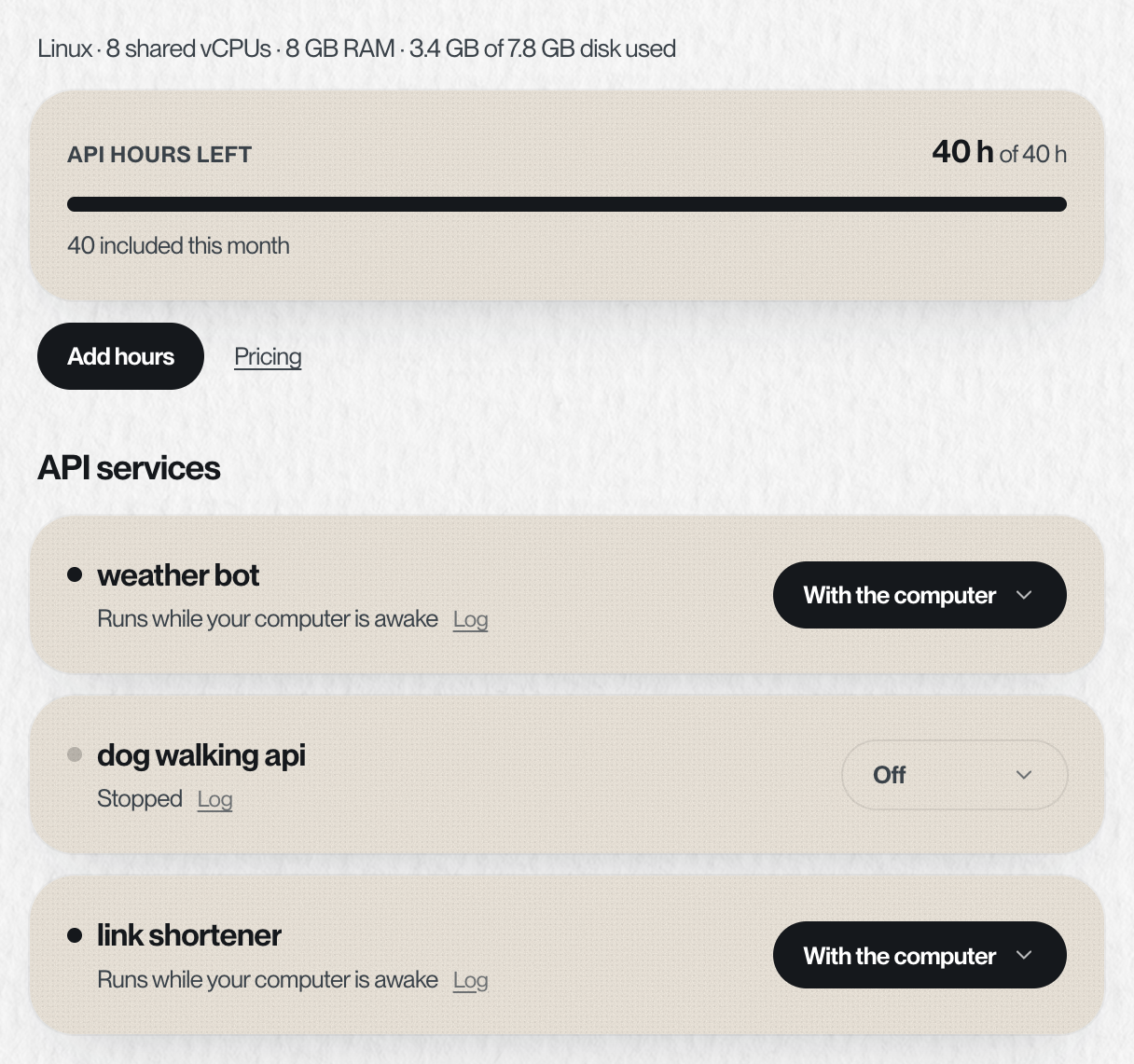
- API hours: what's left this month, and Add hours.
- API services: each service pong is running, with one setting for when it's up: Off, With the computer, On a schedule or Always on. Tap one to read its live log.
- Files: your whole workspace. See Files.
Something missing or wrong? Tell pong, or email founders@vira-labs.com.