Your computer
Host an API
Run an API on your pong's computer and call it from your other systems on a private link.
Ask pong to build an API and it runs it on your computer, then gives you a private link. Your other systems call that link with your secret key.
 pong
pongToday 9:15 AM

$ curl trypong.app/h/Xk2…/api/books \
  -H "Authorization: Bearer pong_…"
[
{ "title": "Piranesi" },
{ "title": "The Idea Factory" }
]Calling it#
Send your secret key from the developer console as Authorization: Bearer. A call without it gets a 401. Opening the link in a browser asks you to sign in with your phone instead.
curl https://trypong.app/h/<id>/api/books \
-H "Authorization: Bearer $PONG_KEY"const res = await fetch("https://trypong.app/h/<id>/api/books", {
headers: { Authorization: `Bearer ${process.env.PONG_KEY}` },
});
const books = await res.json();When it answers#
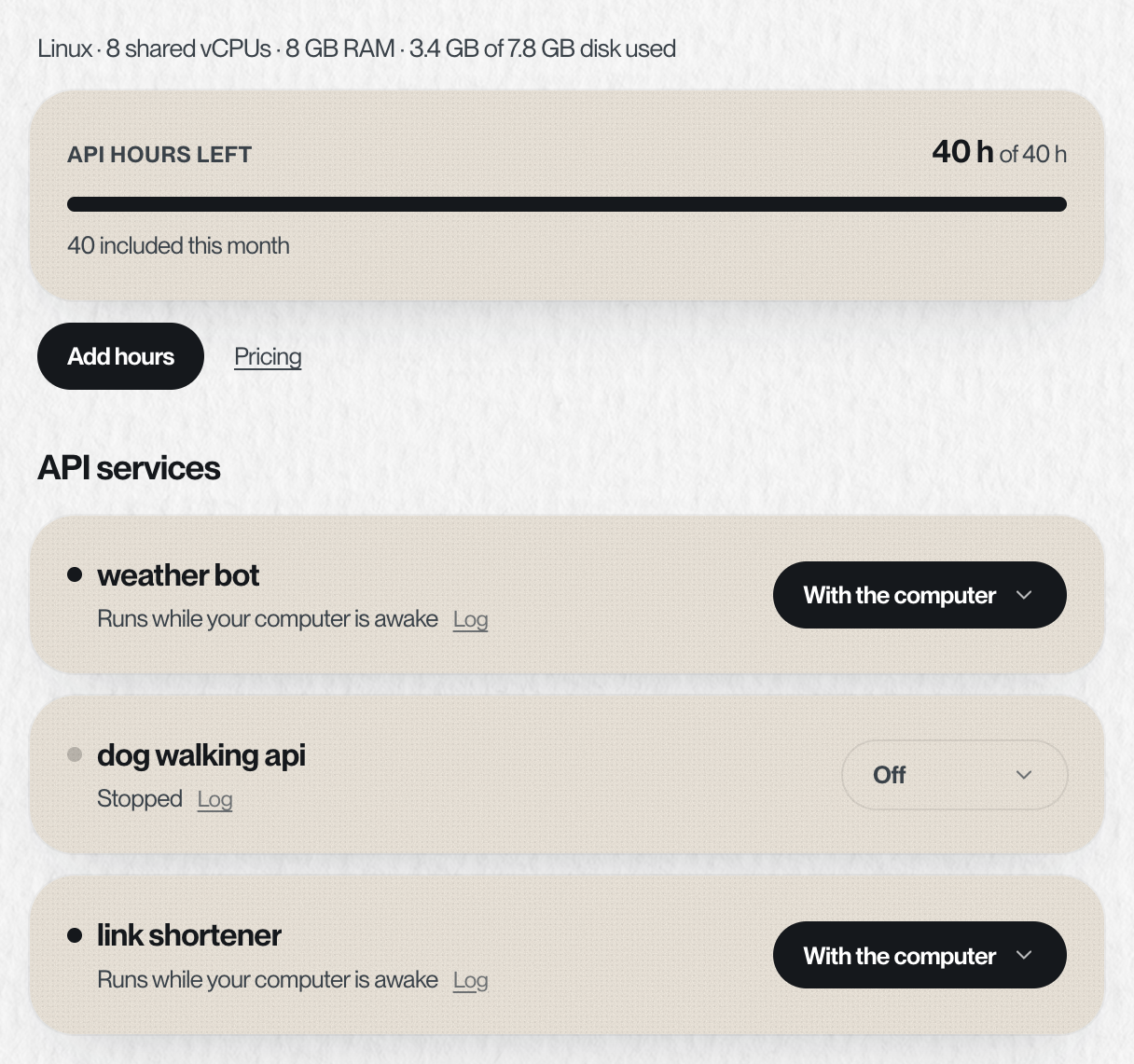
Your computer sleeps when nothing is working. Each service on the computer page has one setting for when it's up. You can also just tell pong, like "keep it up 8:00 to 12:00, Monday to Wednesday", and the page shows the same setting.
| Setting | What happens | Cost |
|---|---|---|
| With the computer | Runs while your computer is awake. While it sleeps, calls time out | Free |
| On a schedule | Stays up between the times you pick, on the days you pick, in your timezone | Uses API hours |
| Always on | Stays up all the time, and a call wakes the computer | Uses API hours |
| Off | Stopped until you turn it on | Free |
Each month includes 40 awake hours for your APIs, and they reset with your month. Only time an API keeps the computer awake counts: texts, the files page and real work don't. You can add more hours, which last 60 days, or keep the computer on all the time. About an hour before the hours run out, pong texts you that the APIs are about to stop. When they run out, the APIs stop and pong texts you that they have stopped, with the link to add hours. Add 40 more for CA$12, or keep your APIs on all the time for CA$99 for 30 days, from API hours on your dashboard. See Pricing.
Limits#
| Rate limit | None |
| Calls waiting at once | Up to 32 |
| Request and response size | 1 MB each |
| Time to answer | 8 seconds, or 45 if the call had to wake the computer |
| Protocol | Plain HTTP. No WebSockets or streaming |
See it and stop it#
The computer page on your dashboard shows each service, what it's doing in plain words, and one setting: Off, With the computer, On a schedule or Always on. Tap a service to read its live log. To take the link down, ask pong.
Something missing or wrong? Tell pong, or email founders@vira-labs.com.